

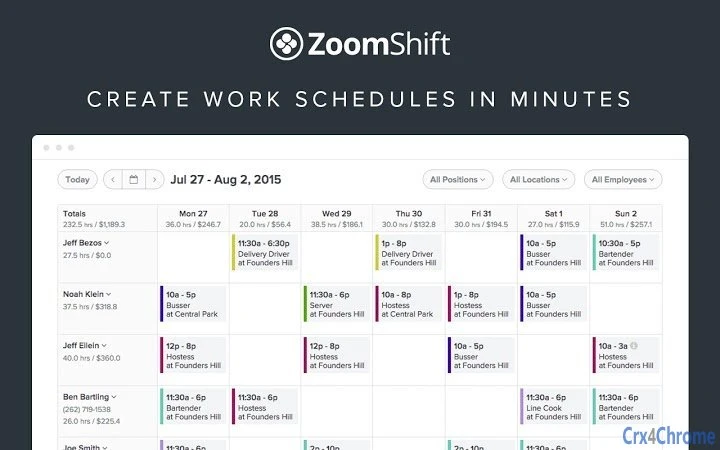
Description
Download ZoomShift – Scheduling Software, Shift Management, Time Tracking
Overview
ZoomShift is a modern workforce management solution designed to streamline employee scheduling, time tracking, and communication. The software addresses common challenges faced by managers, such as time-consuming manual scheduling, miscommunication, and inefficient shift management. By automating routine tasks like shift publishing, employee notifications, and time-off requests, ZoomShift reduces administrative overhead and enhances team coordination.
Target users include small to medium-sized businesses across industries like retail, hospitality, healthcare, and service-based operations. Managers benefit from centralized control over schedules, while employees gain flexibility through mobile access and self-service tools. Real-world usage scenarios include daily shift planning for restaurant teams, managing rotating shifts in healthcare settings, and coordinating part-time staff in retail environments.
Developed by ZoomShift, the platform emphasizes collaboration between managers and staff, offering a unified interface for scheduling, communication, and payroll integration. The software supports cross-platform access, enabling teams to stay connected regardless of location or device.
Key Features & Capabilities
- Automated Schedule Creation: Managers can build optimized schedules based on availability, labor budgets, and staffing needs, reducing manual effort and scheduling errors.
- Real-Time Shift Publishing & Notifications: Once a schedule is finalized, shifts are instantly published and employees receive notifications via email or app, ensuring timely awareness.
- Employee Time Tracking: Built-in time tracking allows staff to clock in and out, with data automatically synced to the schedule for accurate payroll reporting.
- Shift Swaps & Trades: Employees can request or offer shift swaps, which managers can approve or deny, promoting flexibility and team collaboration.
- Time-Off Request Management: Staff can submit time-off requests through the platform, with managers reviewing and approving them in one place.
- Payroll Export Integration: Completed schedules and time data can be exported directly to payroll providers, simplifying end-of-period processing.
- Open Shift Creation: Managers can create open shifts that employees can claim, improving coverage during unexpected absences.
- Calendar Sync: Employees can sync their schedules with iCal and Google Calendar, ensuring they stay aligned with personal and work commitments.
- Internal Messaging: Team members can chat with co-workers, improving communication without relying on external tools.
User Interface, Workflow & Performance
The user interface of ZoomShift is designed with clarity and efficiency in mind. Managers access a centralized dashboard that displays upcoming shifts, time-off requests, and pending swap approvals. Navigation is intuitive, with clearly labeled menus and responsive layout across devices.
Workflow efficiency is enhanced through automation. For example, after creating a schedule, managers can publish it with a single click, triggering automatic notifications to employees. The system also supports batch actions, such as approving multiple time-off requests at once, reducing repetitive tasks.
Performance details were not specified by the developer. However, based on general software behavior patterns, the application is expected to operate smoothly on standard desktop systems. The developer did not specify resource usage details. Stability is assumed to be consistent with similar productivity tools, though real-world performance may vary depending on network speed and system configuration.
Compatibility & System Requirements
ZoomShift is compatible with Windows, Mac, web browsers, and mobile platforms, offering broad accessibility across devices. The application is available as a desktop app and web-based solution, ensuring users can access their schedules from any location.
The installation size is 120 MB, which is moderate for a productivity tool with multiple features. Exact system requirements were not listed, so users should ensure their devices meet general standards for running modern web and desktop applications. Platform compatibility information is limited to the supported operating systems and platforms mentioned.
Pros and Cons
Pros
- Streamlines employee scheduling with automation and real-time updates
- Supports cross-platform access for managers and staff
- Integrates with payroll providers for seamless reporting
- Offers self-service tools for employees, improving engagement
- Free to download and use, with no cost barrier to entry
Cons
- No information provided on advanced customization options
- Exact performance metrics and system requirements are not disclosed
- Limited visibility into third-party integration depth
FAQ Section
Is ZoomShift compatible with Windows and Mac?
Yes, ZoomShift is available for both Windows and Mac operating systems, allowing managers and employees to use the software on desktop devices.
Can I use ZoomShift offline?
ZoomShift primarily operates online, requiring an internet connection for full functionality. However, mobile versions may offer limited offline access for viewing schedules.
Is ZoomShift safe to use?
As a cloud-based productivity tool, ZoomShift likely employs standard security measures to protect user data. Users should ensure they use strong passwords and enable two-factor authentication if available.
How often does ZoomShift release updates?
While update frequency was not specified, the software is actively maintained, with version 2.0.0 released in 2023, indicating regular development and improvements.
What kind of license does ZoomShift use?
ZoomShift is offered as a free software solution, with no subscription or licensing fees required for basic use.
Final Thoughts + CTA
ZoomShift stands out as a practical, user-friendly tool for managing employee schedules and time tracking. Its combination of automation, cross-platform access, and payroll integration makes it ideal for small to mid-sized businesses seeking to reduce administrative workload. While detailed technical specifications are not available, the software delivers clear value through its intuitive interface and collaborative features.
Managers who want to save time on scheduling and improve team communication will find ZoomShift to be a reliable solution. Employees benefit from flexibility and easy access to their work schedules.
Download ZoomShift now
Guides & Tutorials for ZoomShift App for Chrome
How to install ZoomShift App for Chrome
- Click the Preview / Download button above.
- Once redirected, accept the terms and click Install.
- Wait for the ZoomShift App for Chrome download to finish on your device.
How to use ZoomShift App for Chrome
This software is primarily used for its core features described above. Open the app after installation to explore its capabilities.
User Reviews for ZoomShift App for Chrome 0
No reviews found





